On your iPhone 14, you can disable all vibration by navigating to Settings > Accessibility > Touch > and then unchecking the Vibration option.
Our article continues below with further information and screenshots on how to eliminate all iPhone 14 vibration.
Watch this video to learn how to turn off vibration on an iPhone 14.
How to Disable All Vibrations on iPhone 14
The procedures in this post were carried out using an iPhone 14 Plus running iOS 16.5. These techniques are compatible with the most recent iOS versions as well as the vast majority of iPhone devices, including:
- iPhone 14 Pro
- iPhone 14
- iPhone 14 Pro Max
Step 1: Tap the Settings button on your Home screen.
Step 2: Scroll down and select Accessibility.
Step 3: From this menu, select the Touch option.
Step 4: Scroll down to the right of Vibration and press the off button next to it.
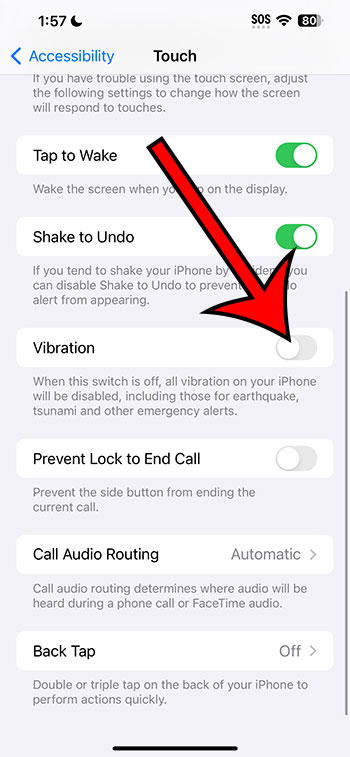
You won’t have to worry about your smartphone buzzing for any reason now that you know how to turn off vibration on iPhone 14.
Vibration on iPhone 14 Video
Additional Information
The methods listed above show how to stop your iPhone from vibrating at all.
This includes messages and comments, as well as any government emergencies or alerts.
If you desire the vibration from specific apps or for things like text messages or phone calls, you can always switch this setting back on and individually tailor vibrating settings.
To turn off phone call vibration, go to Settings > Notifications > Phone > Sounds > Vibration > and select None.
Summary – How to Disable/Enable iPhone 14 Vibration
- Go to the Settings menu.
- Choose Accessibility.
- Select Touch.
- Select the Vibration option.
Related: How to Turn Off Location on iPhone 13
Conclusion
While the iPhone’s vibration feature is beneficial if you keep your phone on quiet or are in an environment where you can’t hear any notification sounds, it may also be annoying.
Rather than sifting through the iPhone’s several vibration settings, this one option within the Accessibility menu may be quite useful for just turning them all off.
You may need to alter your behavior after removing this setting if you were relying on vibration notifications to remind you of new text messages or social media updates.