Switching pals in Pokemon Go is as simple as launching the app, touching the buddy icon, tapping the Swap pals button, selecting Yes, and then selecting a new buddy.
Our explanation of how to change a friend’s Pokemon Go information continues below, with screenshots.
You may also learn more about how to change your buddy in Pokemon Go by watching this video.
How to Switch Your Buddy Pokemon in Pokemon Go
This post’s instructions were accomplished using an iPhone 14 running iOS 16.6. I’m running the latest version of the Pokemon Go software.
Step 1: To begin, open the Pokemon Go application.
Step 2: Select the buddy icon next to your trainer icon at the bottom-left of the screen.
Step 3: Scroll down and click Swap Buddies.
Step 4: To confirm, click the Yes button.
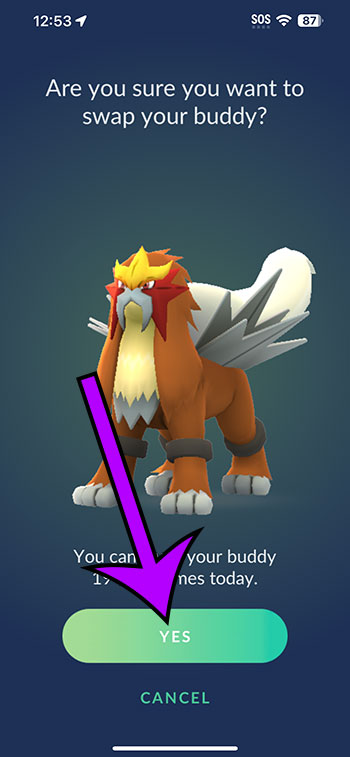
Step 5: Locate the Pokemon you wish to accompany you and tap on it to pick it.
More information on how to change Pokemon Go buddy steps, as well as some basic Pokemon Go buddy system information, is provided below.
Video of Pokemon Go Buddies Swapping
More Details about Pokemon Go Buddies
There are numerous benefits to boosting your friend level. Your Pokemon will soon be able to perform a “catch assist,” in which it will appear on the screen and re-throw a previously missed Pokeball to the target Pokemon.
Any of the following acts will earn you a “heart” for your friend. Here are some examples of actions:
Walking – After feeding your buddy berries to replenish its mood meter, it will emerge on the map and its walking status will advance.
Giving your friend a treat – feed the Pokemon berries till the Pokemon’s mood ring is empty.
Playing with a buddy entails tapping the Play button on the friend screen and then touching the Pokemon until it shows a heart.
Buddy Pokémon was present in your party during a Team Rocket battle, raid, or gym battle.
Taking a picture – When you press the Play button on the friend screen, a camera icon appears at the bottom of the screen. You utilize this to take photographs.
When you visit a new location, you must spin a Pokestop that you haven’t spun previously on a companion journey.
A buddy journey implies you’ve fed your Pokemon berries to make them happier, and you can see it on the map as you travel. You must be able to see your Buddy Pokémon on the map in order to walk, battle, or visit a new destination hearts.
Collecting hearts allows you to advance your buddy Pokemon to higher levels. These are their names:
- Good buddy
- Great buddy
- Ultra buddy
- Best buddy
After you tap the friend sign, the current buddy status is displayed in the top-left corner of the screen
When you set a Pokemon as your best buddy, it can bring you gifts and level up once you achieve the “best buddy” level. When you reach the highest degree of buddy status, your buddy will also earn a buddy ribbon.
Related: How to Sign Out of Pokemon Go on an iPhone 14
Summary of How to Swap Pokemon Go Buddies
- Launch Pokemon Go.
- Tap on your friend’s image.
- Select Swap Buddies.
- Press the Yes button.
- Choose a partner.
Conclusion
Since its first release in 2016, Pokemon Go has gained a lot of new features. The buddy system is one of these. If you want to increase your friend level for numerous Pokemon at the same time, you can learn how to switch buddies in Pokemon Go.
In the game, your Pokemon Go pal has its own level. You can advance your buddy to several levels, similar to the friend system. This happens when you play with a friend, take photos, fight in battles, and so on.
You may have a friend group with which you are presently leveling up. In Pokemon Go, you can swap buddies 20 times every day, allowing you to collect hearts for multiple Pokemon each day.
In Pokemon Go, open the app, tap on your buddy in the bottom-left corner of the screen, and then tap the Swap Buddies button. You can then confirm that this is what you want to do before searching your Pokemon list for the new Pokemon you wish to use as your buddy.
After you’ve switched your friend Pokémon, you may start feeding it berries, playing with it, and going on adventures with it to earn hearts and improve your friend level.
The instructions below will show you how to update your Pokemon Go buddy in order to enjoy this feature.