You can disable the iPhone 13 inverted camera by going to Settings > Camera > and disabling the Mirror Front Camera option.
Our guide continues below with additional information about this topic, including more about what it does and how you could use it.
Introduction
In a world where technology consistently breaks barriers, Apple’s iPhone 13 delivers an intriguing feature – the inverted camera setting. Now, for those scratching their heads, let me guide you on a deep dive into this innovation. Allow me to paint a picture, in vivid tech-color, of how this function is not just a novelty but an evolution of smartphone photography.
The iPhone, since its inception, has been an industry stalwart. With each iteration, Apple has managed to blend art and technology in a manner that’s both accessible and revolutionary. However, with the iPhone 13, they introduced a curveball – the inverted camera setting. At first glance, it may seem like a simple flip or mirror function. But, when viewed through the lens (pun intended) of a photographer or content creator, it’s a game-changer.
You can also watch this video about how to turn off inverted camera on iPhone 13.
How to Stop Mirroring Your iPhone Selifes
The steps in this section were performed on an iPhone 13 in the iOS 17 operating system.
These steps work on many other iPhone models, and many other recent versions of iOS.
Step 1: Open the Settings app.
Step 2: Scroll down and choose Camera.
Step 3: Tap the button to the right of Mirror Front Camera to turn it off.
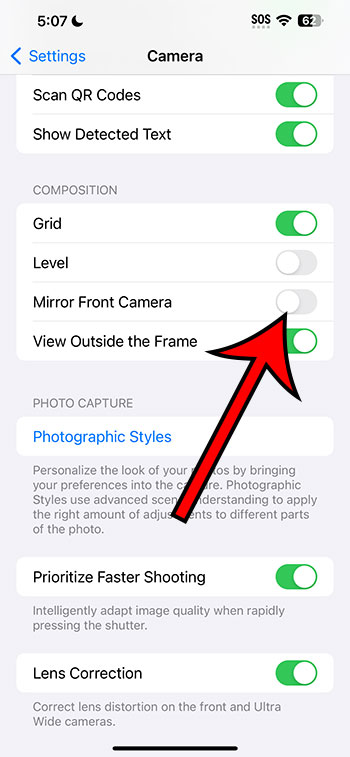
You can continue reading below for more on this topic.
Decoding the Inverted Camera Setting
The inverted camera setting allows users to capture images in a mirrored format. For instance, if you snap a picture of a text from a magazine, the setting will invert it, making it look like a reflection in water. But why introduce such a feature? It’s not merely about aesthetics; it has practical uses too.
- Creative Composition: This setting opens up a world of creativity. Imagine a serene lakeside shot where the sky is reflected perfectly on the water’s surface. With the inverted camera, you could recreate this illusion anywhere, even without a water body in sight. The result? Ethereal, dreamlike photos that stand out in any gallery.
- Optimized Selfies: We’ve all been there – taking a selfie and then realizing the text on our t-shirt is backward. The inverted setting offers an instant fix. This ensures that your pictures are always Instagram-ready, saving time on post-processing.
- Practical Applications: From reading mirrored texts to understanding reflections in a scientific experiment, the feature has practical benefits that can assist in myriad tasks.
Video About the iPhone Camera Inverted Setting
A Notch Above the Rest
Apple’s vision has always been to provide users with tools that amplify creativity, making professional-level artistry accessible to all. The inverted camera setting does just that. It’s not about introducing a gimmicky feature but rather giving photographers – both budding and professional – another tool in their arsenal.
The genius of the iPhone 13’s camera doesn’t stop with the inverted setting. It’s a culmination of hardware and software advancements. But this setting is emblematic of Apple’s philosophy: to push boundaries, to make users think differently, and to challenge conventional photography norms.
Related: How to Record 4K Video on the iPhone 13
Behind the Curtain: The Tech Perspective
The inverted camera setting isn’t a mere mirror function. The iPhone 13 processes the image, ensuring clarity and preserving details. This is no small feat. It takes a perfect blend of software programming and hardware capability to maintain image quality even after manipulating the pixels.
Also, this setting seamlessly integrates with the iPhone 13’s other camera features. Be it Night mode, Photographic Styles, or ProRAW, the inverted setting complements each feature, ensuring that users don’t have to compromise on quality or creativity.
Embracing the Inverted Magic
For those hesitant to explore this setting, I urge you to take a leap. In the vast sea of smartphone photographs, the inverted camera offers a fresh perspective, a new narrative. It’s not about capturing reality but about interpreting it. It’s about looking at the world with fresh eyes and challenging perceptions.
The iPhone 13’s inverted camera setting is a testament to Apple’s commitment to pushing technological and creative boundaries. It stands as a reminder that in the world of art and photography, there are no rules, only interpretations.
In conclusion, the inverted camera setting on the iPhone 13 isn’t just another feature; it’s a paradigm shift. It urges users to embrace a new perspective, to experiment, and to find beauty in inversion. After all, in a world of straight lines and fixed perspectives, a little inversion might be precisely what we need to see things anew.