On an iPhone 14, open Safari, navigate to the page, hit the Share symbol, select Add Bookmark, then adjust the bookmark details and push Save.
Our tutorial continues below with further information, including screenshots, about creating bookmarks in Safari on an iPhone 14.
See this video for additional details on how to create Safari bookmarks on iPhone 14.
How to Create a Safari Bookmark on an iPhone 14
The steps in this post were completed on an iPhone 14 Plus running iOS 16.5.
You can make bookmarks in most prior versions of iOS, as well as on other iPhone models, such as:
- iPhone 14
- iPhone 14 Pro
- iPhone 14 Pro Max
Step 1: From your Home screen, tap the Safari icon to launch the browser.
Step 2: Navigate to the page you wish to bookmark.
Step 3: Tap the Share icon at the bottom of the screen.
It’s the square with the arrow pointing up.
Step 4: Scroll down and click the Add Bookmark button.
Step 5: Change the bookmark’s name and location if desired, then click the Save symbol in the upper right corner of the screen.
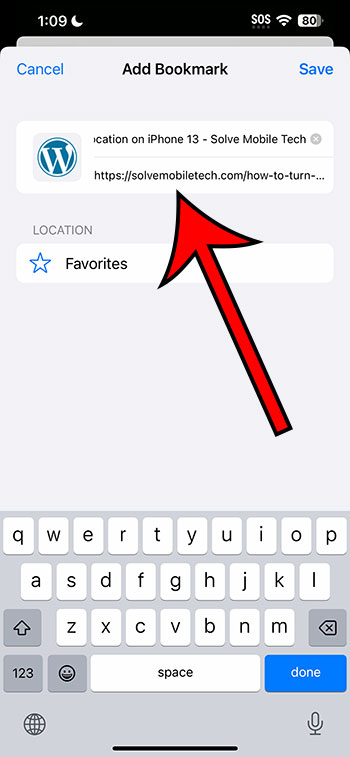
Now that you know how to create Safari bookmarks on iPhone 14, you can make it much easier to reach the Web pages you visit most frequently.
Once you’ve created the bookmark, tap the book icon at the bottom of the screen, choose Bookmarks from the top-left menu, and then navigate to the location where you saved it.
Related: How to Turn Off the iPhone 14 Pop Up Blocker
iPhone 14 Bookmarks Video
How to Save a Web Page on an iPhone 14
- Open Safari.
- Go to the page that you wish to bookmark.
- Click the Share button.
- Choose Add Bookmark.
- Edit the bookmark details before saving.
Conclusion
You can save time and effort by incorporating bookmarks into your mobile Web browsing experience by having an easy way to browse to the pages you desire.
This, like bookmarks on your laptop or desktop computer, can be a great method to categorize important websites as well as useful or entertaining pages you may have discovered while browsing the Web.
As you become more acquainted with the ways for creating Safari bookmarks on iPhone 14, you will learn that it is a helpful tool that you can apply to other devices that you use to explore the Internet.